a bit about
Pixels
|
Fortunately the Eye isn't Perfect
Roughly 125 million photoreceptor cells
are intermingled nonuniformly over the
retina of the human eye. Rods
(roughly.12.700 per inch) perform the
function of a high-speed, black and white
film, while the 6 or 7 million cones
(roughly 4,200 per inch) perform the
function of a low-speed color film.
It could be incorrect to compare the
human eye with a scanner or digital
camera, but the disparity may be
narrowing. Both operate by evaluating the
tonality and color of a single spot of
reality, a process known as sampling.
|
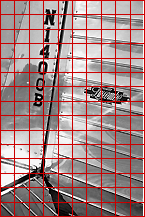
|
Digital
photography is all about samples.
Whether sampled by a row of sensors on
a moving bar (scanner), or with a
stationary array of sensors (digital
camera), the image or object is converted
to a collection of discrete areas called
"picture elements" or "pixels".
Each sensor assigns a single value to
the area it "sees" (in this case zero for
black and 255 for white),
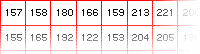 and the
considerable detail that may be contained
within the area is lost. The illustration
at the right is extreme, showing a
sampling rate of about 4 pixels per inch
(ppi). and the
considerable detail that may be contained
within the area is lost. The illustration
at the right is extreme, showing a
sampling rate of about 4 pixels per inch
(ppi).
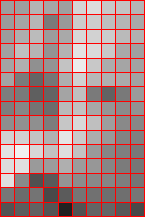
Dividing the image into smaller
squares, by increasing the number of
sensors, will increase the pixel density
and record more detail as shown below.
|
|
The New Leica Manual , Morgan
& Lester, 1951, states that the average eye, at
a viewing distance of 10 inches, can distinguish
individual lines when they are no less than about
1/100 inch apart. Thus, in the final print
viewed from a distance of 10 inches, "any
detail 1/100 inch in size or smaller will be
acceptably sharp." This observation forms the basis
for the calculation of most depth of field tables,
and is also why we often do not see silver grains,
or the dots that make up prints from imagesetters
or digital printers.
a bit about Terminology
SPI (SAMPLES
per inch). Describes the number of samples
(pixels) both horizontally and vertically in each
square inch scanned, or recorded by a digital
camera. A 600spi scan of a one inch document would
supply 600 pixels horizontally and 600 pixels
vertically, a total of 360,000 pixels. One would
hope that each sample covered exactly a 1/600 inch
square.
PPI
(PIXELS per inch). Since the pixel is
the result of sampling, has the same general
meaning as "spi".
DPI
(DOTS per inch). A printers term
describing the fineness of the mesh or "screen"
used to print halftones. It is frequently, INCORRECTLY, used to describe
scanner resolution. It is TOTALLY independent of sampling
frequency (spi) or the actual pixel count of the
image (ppi).
Pixel Density or Pixels Per Inch
(ppi)
So just how small do the pixels have to be? Or,
how many pixels per inch are needed to produce a
print of acceptable quality?.
|
To investigate the effect of pixel
count on prints made with the
ePixel.com laser printer, six
../../IMAGES/digital of the Luscombe tail
shown above left were submitted via the
internet with a request for 4x6 inch
prints. The source was a 600 spi (samples
per inch) scan of a silver print made from
a Minox negative, from which the files
with reduced pixel counts were made with
Photoshop. All were compressed with the
JPEG algorithm at "maximum" setting.
These examples, from a portion of each
resulting print, illustrate the inability
of low pixel counts to render detail,
while demonstrating the equally important
factor of diminishing improvement at
higher counts.
There is a great visual difference
between 50 and 150 pixel per inch
../../IMAGES/digital, and much less
apparent difference between 200 and 300.
|
|
The 200, 250 & 300 ppi prints are
quite similar although repeated shufflings
and reorderings resulted in the correct
order each time. The fact is that behind
Plexiglas, on the wall, or in a scrapbook,
all three would be accepted. BUT, there IS
a difference. Although higher pixel counts
can be utilized by some equipment, 300
pixels per inch has emerged as a useful
compromise between file size and print
quality.
The 150ppi print closely resembles the
quality associated with traditional
photofinishing, and may even provide 4x6
inch prints which are more pleasing than
traditional prints of the same size.
|
|
50 pixels
per inch
|
100 pixels
per inch
|
|

|

|
|
150 pixels
per inch
|
200 pixels
per inch
|
|

|

|
|
250 pixels
per inch
|
300 pixels
per inch
|
|

|

|
|
Although the ../../IMAGES/digital shown
here clearly illustrate the effect of pixel
density, the differences are much less evident in
the full sized prints.
|
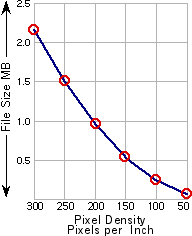
More information is better,
but also requires more storage
space, and more transmission time
over a network or the internet.
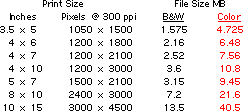
The table below provides some
idea of the file size for
../../IMAGES/digital, using a
pixel density of 300 pixels per
inch.
|
|
|
The 50ppi, file for the 4 x 6
inch print, requires 60 thousand
bytes of storage, while the
300ppi file needs 36 times as
much.
There are two ways to reduce
file size, each with an
unfavorable consequence.
- Reducing
Pixel Counts (seen
here)
- File
Compression (JPEG,
etc.).
If file size is a limiting
factor, the trick is to find the
PROPER
BALANCE of pixel density
and compression to fully utilize
the performance of the printing
system.
|
|
|
|