|
a bit
about Identifying
& Coding
Colors &
Grayscale
Values
|
|
The grayscale can be described with a
series of single numbers, each of which
represents the density of a single pixel.
The illustration below displays 256
discreet values of gray, the darkness of
each pixel in this case, determined by an
8 bit number from 0 to 255. Since we are
dealing with a single ink (black), only
one value is needed for each pixel.
|

|
|
If we are to display color, we need at
least three values per pixel.
|
So how can we identify any one of the infinite
number of colors? "Teal" or "olive" don't mean much
to a computer, indeed may be ambiguous to the paint
store owner or thread shop proprietor. But XX
Company Paint #43, or BestThreads #465, do provide
a precise way to obtain a specified color - at
least that manufacturers version thereof (in that
specific dye lot).
We do need a system to describe the variety of
colors in the spectrum in a way the computer can
understand and manipulate. Three of the popular
systems in use are described below.
- HSL -
numerical values for the hue,
saturation, and
lightness of the color
- CMY - the
percentages of the "primary" colors
cyan, magenta, and
yellow
- RGB - the
level of each of the "primary"
colors red, green, and
blue
As usual, there is a
"gotcha". Even if we can devise and specify a
precise number or number combination for a color,
the hardware manufacturers AND software developers
must combine the elements described below in
precisely the right combinations or the color will
differ on each monitor or from each printer.
|
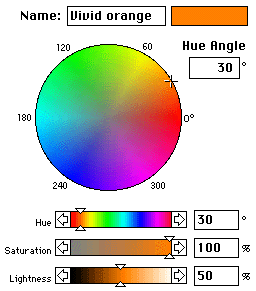
HUE The
color wheel is a familiar artists tool.
Why not describe colors by their angular
position on the wheel?
- If red is arbitrarily assigning a
value of zero degrees - then
- yellow becomes 60
- green, 120
- cyan, 180
- blue, 240
- and magenta, 300
Since orange is half-way between red
and yellow, it becomes 30 degrees or just
30.
Colors also have an attribute which
describes the "amount of pigment" or
percentage of pure color . It is called
SATURATION. Zero
saturation means no color, only grayscale.
LIGHTNESS
- describes the scale from darkest to
lightest. Orange becomes brown as
lightness is decreased.
|
|
|
CMY
Anyone familiar with photographic color
printing has an intimate knowledge of the
use of cyan, magenta, and yellow filters.
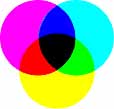
The relationship between
C(yan)M(agenta)Y(ellow) and
R(ed)G(reen)B(lue) is illustrated at the
right. Passing white light through a cyan
and magenta filter will permit blue light
to pass. Color printers work in much the
same way, applying the correct proportions
of cyan, magenta, and yellow ink to
produce the desired color. Since the black
produced by the application of the three
colors is rather muddy, black ink is
usually added, hence we have CMYK, where K
stands for black. Use a magnifying glass
to study a color picture in a magazine.
RGB
CRTs (video monitors and TVs) use red,
green, and blue dots to create the
spectrum. Red and blue combine to make
magenta; blue and green to make cyan; red
and green to create yellow. Hard to
believe? Look at the yellow area on your
screen with a magnifying glass. While
doing that, look at the surrounding area
where the presence of all three, RG&B,
combine to give the appearance of white.
You will see below that white is produced
by the presence of all three in the RGB
color scheme, and the absence of all three
in the CMY color scheme.
|
|
|